Brick FlashingFor Your Front Porch Ledger and MoreLike ledger flashing, installing brick flashing is not difficult to do and will extend the life of your front porch or deck.Water and ledgers don't mix and that is why most fail. To prevent wood rot it is important to install flashing over your ledger board properly. Brick ledger flashing covers the ledger and prevents water from touching it just like flashing under siding; however, the process for installing it is a little different. 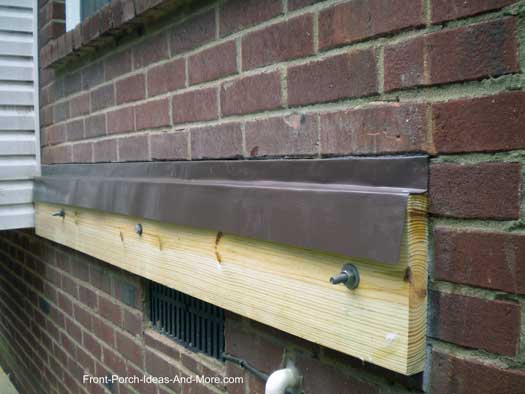
Flashing installed over ledger board on brickWe'll walk you through the basic steps so you'll have a very good idea of how it is done whether you decide to do it yourself or hire a licensed contractor. And if you do hire a contractor, make sure they properly add brick flashing to your porch or deck.The following description is for informational purposes only.
NOTE: Always check with your local building codes department before installing a brick ledger board.
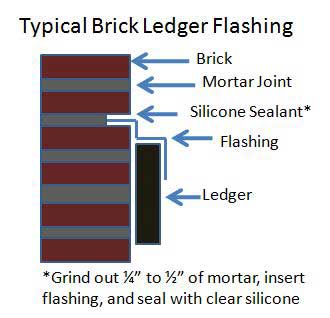
Brick Flashing Basic TipsStep 1Mark a line for the ledger board.Step 2Find a grout line that is approximately 2 inches or more above the ledger board line. This line ensures your flashing will be above the actual porch floor or deck flooring material.Step 3Grind out 1/4 to 1/2 inches of grout about an 1/8th inch wide. I like to use a fiber blade on a circular saw. You can use a diamond blade but for small jobs a fiber blade is much less expensive to use.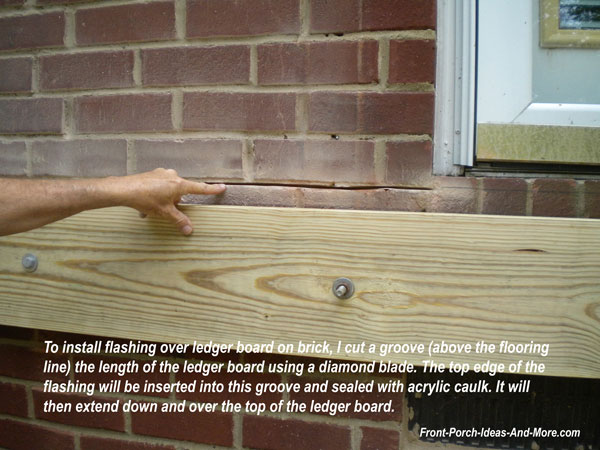
TIP: When using a fiber blade understand that the blade will wear down quickly. On long cuts it will be necessary to readjust the depth of the cut to ensure you get a consistent cut line. Step 4Use a cold chisel and hammer to chisel out the grout line at corners.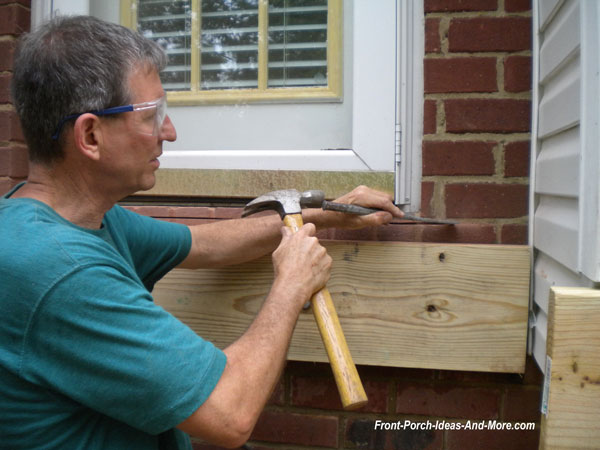
Step 5Clean the cut line with a brush.Step 6Purchase or make the flashing. You may be able to purchase flashing meant for brick work or in some cases you can modify Z-track flashing to work.Step 7Install the ledger board according to local building codes. Refer to our ledger board section for important considerations regarding the proper installation of ledger boards.
CAUTION: You must never attach a ledger board to the brick veneer on a home.
There is a space between the brick veneer and the sheathing of your home. Ledger boards must be securely fastened to your home's framing.
Step 8Place a generous amount of silicone caulk in the cut line. Insert the flashing into the cut line and over the ledger board. Please see our ledger flashing section for a detailed photo of proper flashing placement (although brick flashing will be a bit different).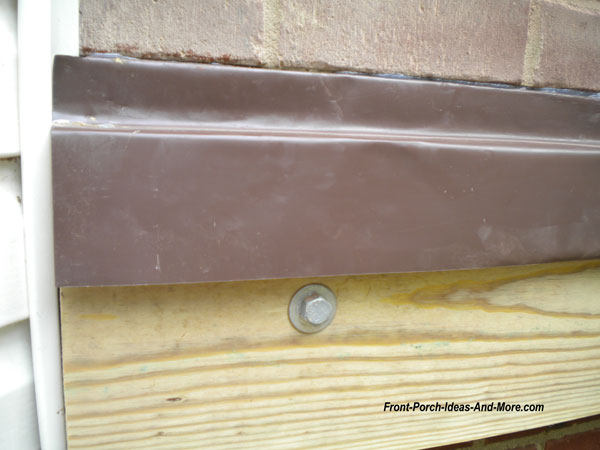
Step 9Do not nail into the flashing. If you must, seal any openings with silicone caulk.Sandy, from Long Island, asks how high could her porch floor be installed on a brick wall. See our response about the height of a porch floor. See our information about flashing on siding - a must see for most porch builders! You Are Here:

Hi! We're Mary and Dave, lifelong DIYers, high school sweethearts, and we both love porches. You've come to the right place for thousands of porch ideas. Our Sponsors


End Sponsors Helpful LinksEnjoy shopping Amazon (affiliate link)Popular PagesWhat's NewJoin Our Newsletter Family Porch Designs Porch Ideas for Mobile Homes Find a Local Contractor Build a Porch | Small Porches Porch Columns | Porch Railings Screened Porches Porch Curtains | Porch Enclosures Porch Landscaping | Vinyl Lattice Porch Decorating | Porch Ideas Shop Navigation AidsHome | Top of PageSite Search | Site Map Contact Us PoliciesDisclosure Policy | Privacy PolicyLegal Info Please Join Us Here Also



Find a Trusted Local Pro Copyright© 2008-2024 Front-Porch-Ideas-and-More.com All rights reserved. No content or photos may be reused or reproduced in any way without our express written permission. At no extra cost to you, we earn a commission by referring you to some products on merchant sites. See our disclosure policy. We, Front Porch Ideas and More, confirm, as stated on our privacy policy, that we do not sell personal information. All content here is solely for presenting ideas. We recommend consulting with a licensed, experienced contractor before you begin your project. We make no guarantees of accuracy or completeness of information on our site or any links to other websites contained here. Thank you for taking your time to stop by. See what's popular and new here. 
|
Hi! We're Mary and Dave, lifelong DIYers, high school sweethearts, and we both love porches. You've come to the right place for thousands of porch ideas. --- Our Sponsors ---
--- End Sponsors ---Find Top-Rated Service Pros
Our Newsletter, Front Porch AppealLearn more!Thank you for being here! |
|
|
At no extra cost to you, we earn a commission by referring you to some products on merchant sites. See our disclosure policy.
We, Front Porch Ideas and More, confirm, as stated on our privacy policy, that we do not sell personal information. All content here is solely for presenting ideas. We recommend consulting with a licensed, experienced contractor before you begin your project. We make no guarantees of accuracy or completeness of information on our site or any links to other websites contained here. Front Porch Home | Return to Top Contact Us | About Us | Advertise with Us | Search | Site Map Media | Privacy Policy | Disclosure | Legal Notice | What's New 

|
||
|
No content or photos may be reproduced or copied in any way without our express written permission. 
| ||